
A weekly injection-record checklist
This checklist is for the record you make after an injection event. It does not explain how to administer medication, choose a dose, select an injection location, or respond to a missed dose. Use it simply to make sure the history reflects what actually happened.
Before you use the checklist
Treat each item as a recordkeeping prompt, not a clinical instruction. The medication label, official instructions, and your healthcare professional are the sources for how to use your medication. If what happened differs from your plan, record the event accurately and ask a qualified professional any treatment question rather than using the log to decide what to do next.
The weekly injection-record checklist
1. Confirm the entry date
Check that the date belongs to the injection event. If you are logging later, do not leave today’s date in place by accident. A correct date keeps the history in sequence.
2. Record your medication and dose
Use a clear medication name and enter the dose as you recorded it, including the correct unit. The FDA includes medication name and strength among the basic information in a current personal medication list. This checklist does not determine what your dose should be.
3. Record the time
Use the time the event occurred when you know it. If you only know an approximate time, do not create false precision; a short note can preserve that limitation.
4. Add the injection site if desired
Record the site only as a detail of the event. The field is optional and should not be read as advice about where to administer medication.
5. Add optional context or notes
Keep the note specific and brief: a schedule disruption, travel context, or another detail you may want to remember. Avoid turning the note into an explanation of what caused a symptom or change.
6. Record weight or symptoms only when you want to
A dose entry is complete without a weight or symptom check-in. Add these observations only when they are useful to you. Describe a symptom in plain language and keep it separate from assumptions about its cause.
7. Review that the entry reflects what actually happened
Read the saved details once. Check for the easy-to-miss errors: yesterday versus today, a missing unit, the planned amount copied instead of the recorded event, or a note attached to the wrong entry.
A compact version to keep nearby
A consistent checklist should make logging feel lighter, not more demanding. If a field does not help you review the routine, leave it optional. Accuracy in a few stable fields is more useful than a long entry you are unlikely to maintain.
- □ Entry date is correct
- □ Medication name is clear
- □ User-recorded dose and unit are correct
- □ Event time is recorded
- □ Injection site is added, if desired
- □ Optional context is factual and concise
- □ Weight or symptoms are added only if desired
- □ Final entry matches what actually happened
After saving: correct known errors, keep uncertainty visible
If you spot a typo, correct it while the event is still fresh. If you are uncertain about a detail, preserve that uncertainty instead of guessing. A note such as “time approximate” is more honest and more useful than an exact time you cannot verify.
If the entry raises a question about dosing, timing, symptoms, or treatment, stop at the question. Use the appropriate medication instructions or contact a qualified healthcare professional. The record is there to support the conversation, not answer it.
A focused logging flow
Shotz keeps the checklist small.
The Shotz log screen groups date, time, medication, dose, injection site, and optional check-ins in one place. Recent entries can be revisited when you need to correct a known detail.
See the related Shotz feature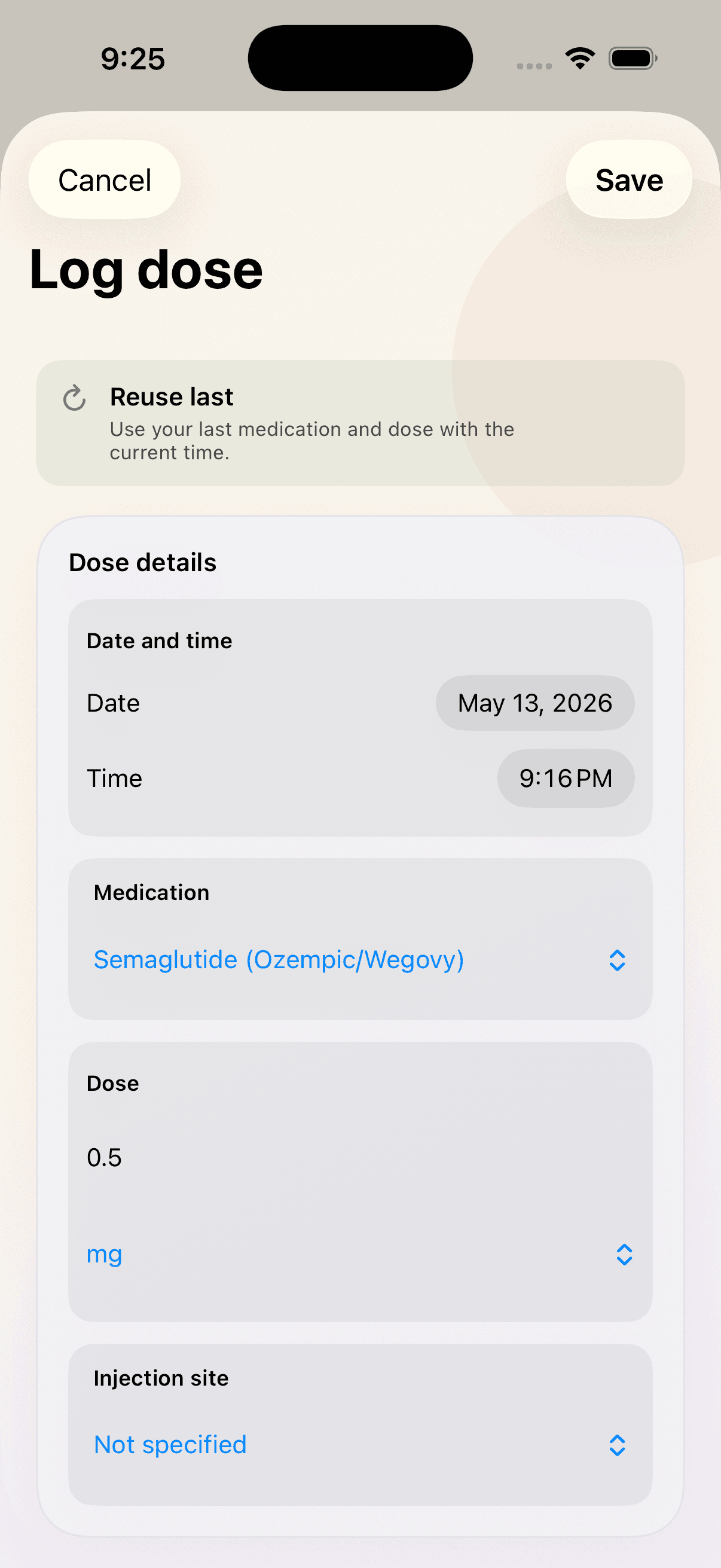
Keep the routine together in Shotz.
Plan, log, and review your routine in one considered iPhone and iPad app.
Download on the App StoreResearch
Sources
Authoritative sources were opened and checked against the health-related statements they support. Product descriptions come from the current Shotz interface and site implementation.
- 1. Create and Keep a Medication List for Your Health — U.S. Food and Drug Administration. Using clear medication-name and strength information and keeping a current personal medication record.
Editorially reviewed for clarity, sourcing, product accuracy, and medical boundaries. This article is not medical advice. Read the Shotz Editorial Standards or request a correction at simon@shotzapp.app.
Continue reading
Related guides
What to include in a GLP-1 dose log
A practical, non-medical guide to recording medication, user-entered dose, timing, optional injection site, notes, weight, and symptoms in a useful GLP-1 dose history.
Published August 11, 2026 · 4 min read
Symptom notesHow to record symptoms without relying on memory
A practical guide to recording symptom observations with clear timing, context, and consistent language—without diagnosing or claiming causation.
Published August 11, 2026 · 4 min read